
iter0
Back to templates

Apps

App Waitlist Website

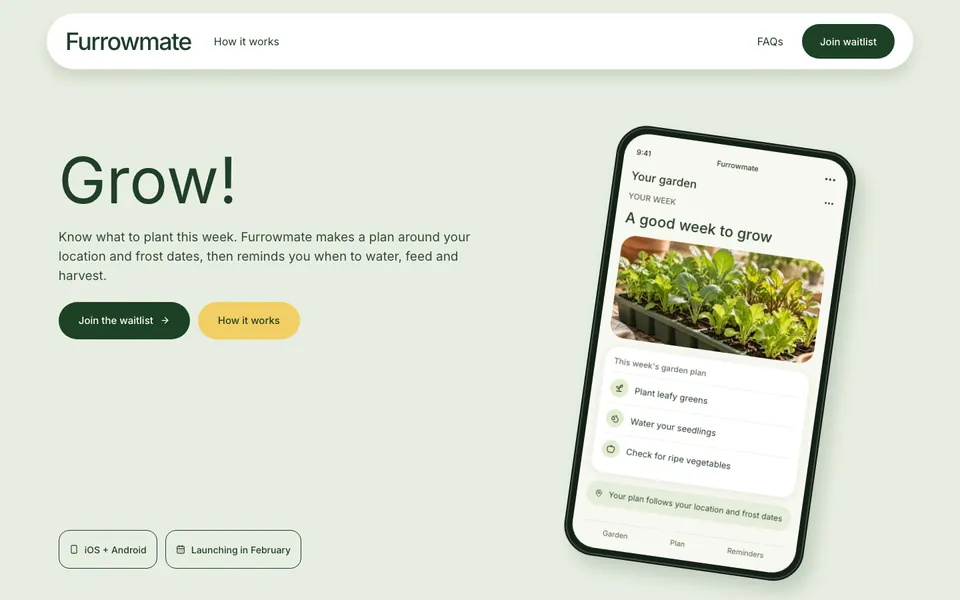
A fresh, friendly app launch template with a phone mockup in the hero, feature cards with app screens, three steps, a waitlist form with a founding-member discount and common questions.

Best for

mobile apps before launch, consumer software, new products taking sign-ups, beta programmes and crowdfunding pre-launches

Start with this visual direction, then adapt the content to your business in the builder.

Use this template

Page flow

A clear path through the product story

A short headline, a plain description and a waitlist button sit beside a phone showing the app. A band of three highlights follows, then feature cards with screens from the app, three steps to get started, a waitlist form with the founding-member offer and a few common questions.

What it communicates

Why this structure works

Before launch, the only job is to turn interest into an email address. The page explains what the app does in one screen, shows it working, and repeats the waitlist offer beside the questions people ask.

How to adapt it

Make it about your business

  1. Rewrite the headline and description around what your app does, and replace the phone mockup with your own screens.
  2. Change the feature cards and three steps to how your app works.
  3. Set the launch date, platforms and founding-member offer to your own.
  4. Connect the waitlist form to your email tool, and answer the questions people ask you most.

What to bring

Prepare these before you build

  • Screens or mockups from your app
  • A one-line description of what it does
  • Your launch date and platforms
  • Any offer for early sign-ups
  • The questions people ask about it

The template sets the visual direction. Your own business details, brand, images and proof supply the content.

App Waitlist Website template questions

What should an app waitlist page include?

Visitors want to know what the app does, when it launches and why they should sign up now. This template covers those with a phone mockup in the hero, feature cards with app screens, three steps, a waitlist form with a founding-member offer and common questions. Keep the launch date honest.

Can I collect waitlist emails with this template?

The form asks for an email address. Connect it to the email tool you use, such as a newsletter service, so sign-ups land in a list you can contact at launch. The builder does not store sign-ups for you, so test the form before you share the page.

Does this layout work for software that is not an app?

Yes. Swap the phone mockup for a screenshot of your product, rename the platforms and keep the waitlist form. Desktop software, browser extensions and online services can use the same order: what it does, how it works, then the sign-up.