
iter0
Back to templates

Services

Barbershop Website

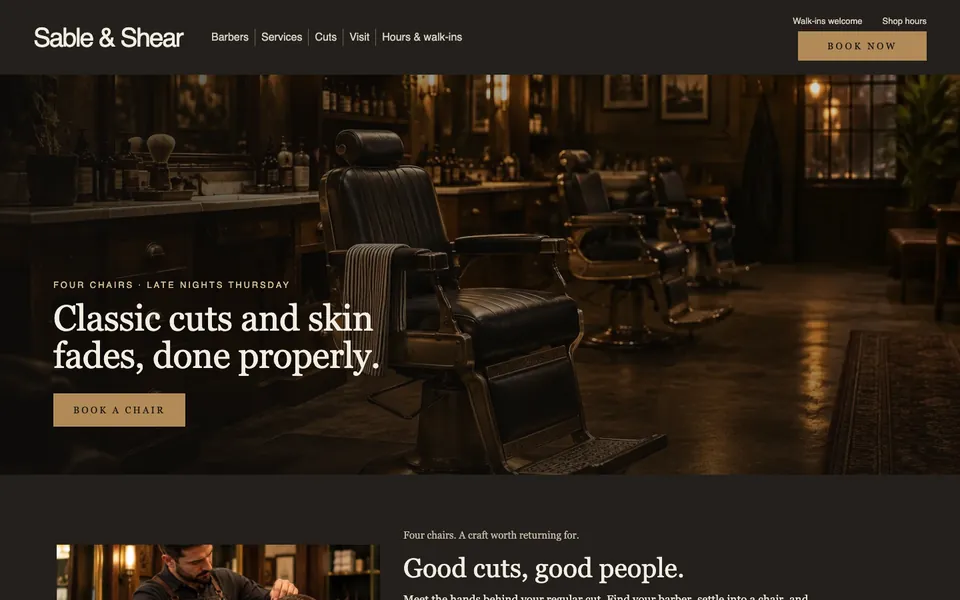
A dark, vintage barbershop template with booking in the hero, the barbers and what each one does best, a service menu with prices, recent cuts, opening hours and walk-in times.

Best for

barbershops, hair salons, beauty and grooming studios, tattoo studios, any shop that books chairs or appointments

Start with this visual direction, then adapt the content to your business in the builder.

Use this template

Page flow

A clear path through the product story

The hero puts the headline and a Book a chair button over a photo of the shop. The barbers come next, each with the work they do best, then the service menu with prices, two featured cuts, the opening hours with walk-in times, a photo of the floor and a footer with a second booking button.

What it communicates

Why this structure works

Clients check three things before they book: who cuts, what it costs and when you are open. The page answers each one and keeps a booking button within reach of every section.

How to adapt it

Make it about your business

  1. Replace the photos with your own shop, chairs and recent cuts, and rewrite the headline around what you are known for.
  2. Add your barbers by name with the cuts each one does best.
  3. Set the service menu to your own services, times and prices.
  4. Point every Book button at your booking system, and set your hours and walk-in times.

What to bring

Prepare these before you build

  • Photos of your shop and your barbers at work
  • Your services with prices and how long each takes
  • Opening hours, late nights and walk-in rules
  • Your booking link or the system you use
  • Your address, parking and how to find the door

The template sets the visual direction. Your own business details, brand, images and proof supply the content.

Barbershop Website template questions

What should a barbershop website include?

Clients want to know who cuts, what each service costs, when you are open and how to book. This template covers those with a booking button in the hero, the barbers and their specialties, a priced service menu, recent cuts and your hours with walk-in times. Use photos of your own shop and your own work.

Can clients book a chair through this template?

Every Book button opens a short booking form for the service, the barber and a preferred time. Link the buttons to your booking system instead if you already use one. The builder does not manage your appointment calendar, so test the form or the link yourself before the page goes live.

Does this layout work for a hair or beauty salon?

Yes. Rename the barbers to your stylists or therapists, change the service menu to your treatments and prices, and swap the photos for your own room and work. If you do not take walk-ins, turn that panel into a note about booking ahead and your cancellation policy.