
iter0
Back to templates

Services

Event Website

A fresh, oceanic event template with a ticket button on the first screen, the agenda for both days, a speaker lineup, three ticket tiers, venue and travel, a sponsorship enquiry and common questions.

Best for

conferences, summits, festivals, industry events, meetups and any event that sells tickets

Start with this visual direction, then adapt the content to your business in the builder.

Use this template

Page flow

A clear path through the product story

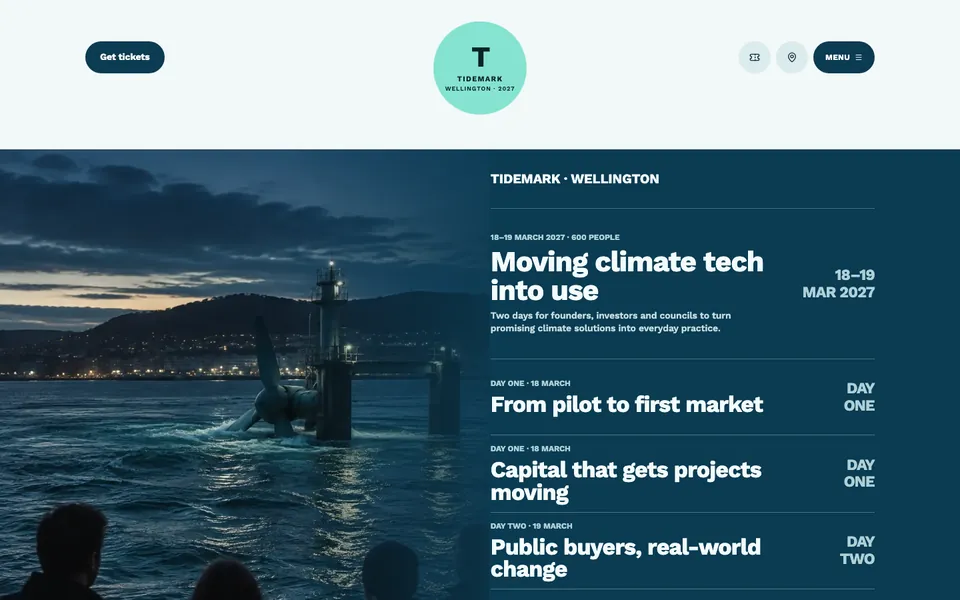
A harbour photo sits beside the event name, the dates and an outline of both days, with Get tickets in the header. Agenda highlights follow, then the speaker lineup, why the event matters, three ticket tiers, the venue with travel details, common questions and a sponsorship enquiry form in the footer.

What it communicates

Why this structure works

Attendees decide on the date, the programme, the price and how to get there. The page shows each of those before the footer and keeps a ticket button on the first screen.

How to adapt it

Make it about your business

  1. Rewrite the event name, dates and the outline of each day around your own programme.
  2. Replace the speaker cards with confirmed names, or keep them as placeholders until you can announce them.
  3. Set your ticket tiers, prices and who each tier is for, and link the buttons to your ticketing platform.
  4. Update the venue, travel notes and questions, and connect the sponsorship form to an inbox you check.

What to bring

Prepare these before you build

  • Your event name, dates, city and expected numbers
  • The programme for each day
  • Speaker names and photos, or the date you will announce them
  • Ticket tiers with prices and who qualifies for each
  • Venue address, travel options and sponsorship packages

The template sets the visual direction. Your own business details, brand, images and proof supply the content.

Event Website template questions

What should an event website include?

Attendees want the date, the programme, the speakers, the price and how to get there. This template covers those with tickets on the first screen, the agenda for each day, a speaker lineup, three ticket tiers, venue and travel details, common questions and a sponsorship enquiry. Update the agenda as sessions are confirmed.

Can people buy tickets through this template?

The ticket buttons suit an event sold through a ticketing platform. Link each tier to its page on the platform you use, so buyers pay there. The builder does not sell tickets or manage capacity, so test every link yourself before you share the page.

Can I launch the page before speakers are confirmed?

Yes. The speaker cards work as placeholders that describe the kind of voices you expect, such as founders or investors. Replace each card when a speaker confirms, and add a line saying when the full lineup will be announced so early buyers know what to expect.