iter0 and v0
iter0 vs v0: which to use for a startup landing page
Pick v0 if you are building the product itself and your team will look after the code. Pick iter0 for the launch site of what you built in v0, Lovable or Bolt, made from a brief: it researches your market, sharpens the message and gives you a site you edit by pointing at it, with no codebase to maintain. Plenty of teams use both.
Are you building the app, or the website that sells it?
Updated
Decision table
Compare the work you need to keep doing.
Which to choose
When each tool is the better choice.
Choose v0 when
You are building the product itself, with authentication, a database, and API integrations, and want the code in a Next.js and React stack.
Your team works in GitHub and wants AI changes to arrive on a working branch as a pull request for review.
You want to publish straight to Vercel and keep the marketing page inside the same codebase as the application.
Choose iter0 when
The application is taking shape but nobody has decided who the website is for or what it can prove, and you want Launch CEO to work that out before the page is built.
The marketing page has to follow your current site or a site whose design you like, and the person changing it will work in a builder instead of a Next.js repository.
You want the marketing page kept out of the application codebase, as one HTML file that can change without an application release.
How to decide
Separate product UI from the website that sells it
A startup may use both tools. Keep product requirements in the application lane and launch claims in the marketing lane so interface progress does not become unsupported website proof.
Name the artifact that must remain editable.
Decide who owns deployment and later changes.
Supply real product screenshots when the marketing page describes the product.
Test both the product flow and the website action.
Using both
Keep the product in v0 and the launch page in iter0
Build and ship the application in v0, where the code, GitHub branches, and Vercel deployment live. Build the public page that explains it in iter0: work through the buyer and proof with Launch CEO, then edit the page until each claim matches what the product does today. For product images, take screenshots of the running v0 application instead of drawing mock-ups, so buyers see the interface they will actually use. If you later want the marketing page inside the same Next.js codebase, v0 accepts screenshots and mockups as input, and a screenshot of the approved page can be the visual reference for that rebuild. v0 writes new code in that case, so review its pull request before merging.
iter0 design example
Example: explain a technical product with visible operating detail
Agent Operations gives evaluations, approvals, integrations, and run states their own visual space. The page uses application-like evidence to explain the offer without pretending the marketing site is the product itself.
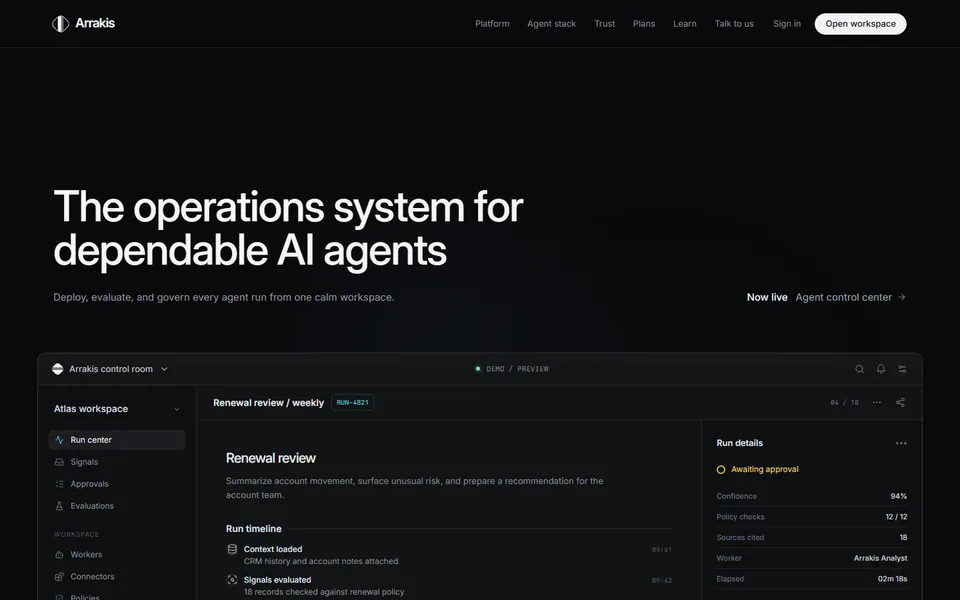
Built in iter0 for a technical product with a lot to explain.
Open examplePrices
What each plan costs.
Checked on each pricing page on 22 October 2026. Prices are in US dollars.
v0 and iter0: common questions
Which is better for a startup landing page, v0 or iter0?
If the landing page belongs inside a Next.js codebase that your team already deploys to Vercel, v0 fits, and its documentation lists landing pages among the things it builds. If the page is a separate marketing site and the open question is the message, buyer, and proof, iter0 starts with those and returns one editable HTML page. The tools can also split the work, with v0 building the product and iter0 building the page that explains it.
What can I give v0 or iter0 to start a build?
v0 takes natural-language descriptions, wireframes, mockups, and screenshots, along with the requirements of the application you want built. iter0 takes a launch brief, your current public site, or a site whose design you like, and its Launch CEO conversation turns a rough idea into a brief about the buyer, offer, and proof. iter0 does not build application logic, databases, or authentication, so give it the website part of the job.
Can I export code from v0 and from iter0?
Yes, in different forms. v0's documentation says you can export the code to work locally and sync changes through its GitHub integration, which opens branches and pull requests. iter0 gives you the finished page as HTML: you can view and edit it in the code view, copy it, or download it as a standalone HTML file that any web host can serve.
Do I need to know how to code to use v0 or iter0?
Neither tool asks you to write code to get a first result, because both start from plain-language descriptions. What you look after afterwards differs. A v0 project is an application codebase, so someone will usually review and deploy the code. Each iter0 page is an HTML file you change in the builder with AI or manual edits, then host wherever you choose.
Keep comparing
More comparisons and reading.
- AI website builders comparedDo you need business tools in one place, or help working out what your site should say?
- iter0 vs FramerDo you need a design canvas, or help with what to say?
- iter0 vs WebflowDo you need a content platform now, or a clear launch site first?
- iter0 vs LovableAre you building the app, the website, or both?
- iter0 vs DurableDo you need bookings and a customer list, or a launch page you own as files?
Try your own brief.
Tell the Launch CEO what you sell. It checks your competitors, asks what it needs, and builds your site. Free to start.