AI website builder comparison
Choosing between iter0 and an AI website builder
Pick Wix, Framer or Webflow if you want a store, bookings or a CMS in the same account as your site. Pick iter0 if the hard part is knowing what your site should say: its Launch CEO checks your competitors, asks one question at a time, and builds from the brief it writes with you. We gave four builders the same two briefs; the results are below.
Do you need business tools in one place, or help working out what your site should say?
Updated
Our test, 5 October 2026
Same brief, side by side.
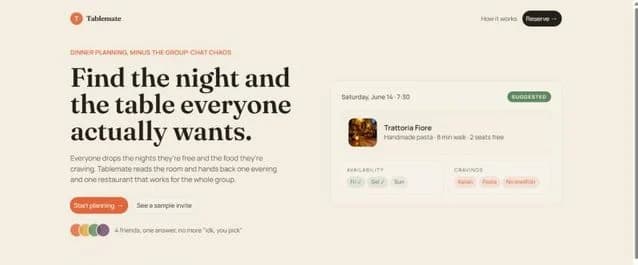
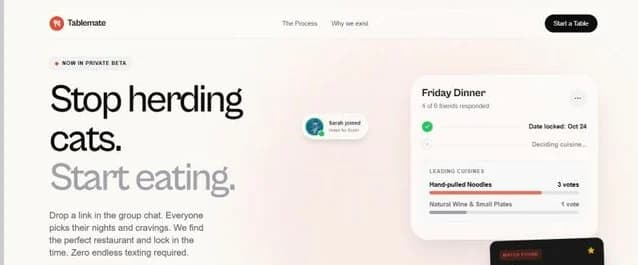
We typed the same two briefs into iter0, Lovable, Framer and aidesigner and kept what each one built. Free plans for the others; the screenshots are as captured, from each tool's own preview or canvas.
Tablemate
“I have an idea for an app called Tablemate that helps groups of friends plan dinners out: everyone adds the nights they're free and what food they like, and it suggests a time and a restaurant that works for everyone. Build a landing page for it.”


Shiplog
“Build a website for Shiplog, a B2B SaaS tool that turns merged GitHub pull requests into customer-facing release notes and a changelog page automatically. It's for engineering teams at startups with 10 to 200 people. I want visitors to start a 14-day free trial.”


Decision table
Compare the work you need to keep doing.
Which to choose
When each tool is the better choice.
Choose General AI website builders when
You want hosting, a domain, and the editor in one account, so the site goes live without a separate deployment step.
The business needs built-in commerce or booking tools, such as the online store and scheduling features Wix lists for its AI builder.
You need a multi-page site that non-technical staff will keep editing in a drag-and-drop or visual editor for years.
Choose iter0 when
You know the business but not yet the pitch, and want the Launch CEO conversation to pin down the buyer, the offer, and the proof before a page is generated.
You want the design to start from your current site or a site whose design you like instead of a theme the builder generates.
You already pay for hosting and want one launch page as an HTML file you can download and upload there.
How to decide
Use one real brief to test both paths
Give each tool the same offer, buyer, proof assets, required sections, and primary action. Judge the published page rather than the first editor preview.
Read the first screen at phone width.
Replace one claim without changing an approved section.
Run the primary form or action.
Inspect title, canonical, headings, links, and image delivery.
Using both
Settle the launch page first, then choose the platform
Start in iter0 when the open question is what the page should say. Work out the buyer, offer, proof, and section order with Launch CEO, then build and edit a single launch page until it reads well at phone width and you can back every claim on it. From there you have two routes. Download the page as a standalone HTML file and put it on a static host you control. Or, when the business needs a blog, a store, bookings, or a CMS, rebuild the page in a hosted platform such as Wix, Framer, or Webflow, using the approved page as the brief. Nothing carries across automatically on that second route, so compare each rebuilt section with the approved page before you move traffic to the new site.
iter0 design example
Example: a service page with a calmer decision path
Wellness Membership uses programme structure, practitioner context, and a low-friction trial path. The visual treatment follows the service decision instead of applying a standard software dashboard theme.
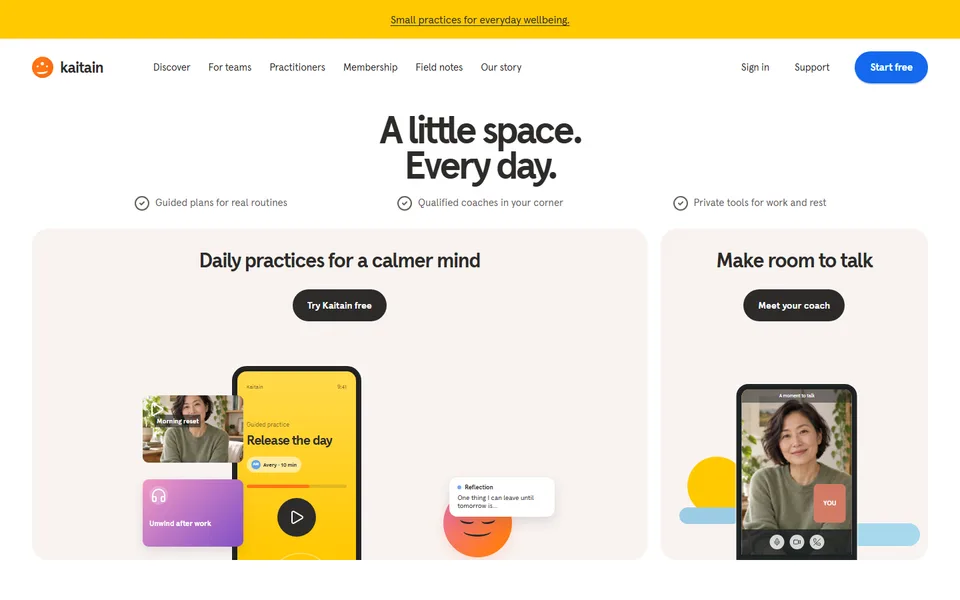
Built in iter0 from a short brief for a wellness studio.
Open examplePrices
What each plan costs.
Checked on each pricing page on 22 October 2026. Prices are in US dollars.
General AI website builders and iter0: common questions
What is the best AI website builder for a startup launch page?
Choose by what the site must do after launch. If it needs hosting, a store, or bookings in one account, a general builder such as Wix, Framer, or Webflow provides them in one platform. If the harder problem is deciding who the page is for and what proof it can show, iter0 starts with a Launch CEO conversation about the buyer, offer, and proof, then builds one editable page from the answers.
Is iter0 a Wix alternative?
Wix describes its AI builder as creating a business-ready site with hosting, online stores, booking systems, and email marketing in one platform. iter0 builds one editable HTML page per build and can turn a saved page into a multi-page site. It can also publish each site at its own <name>.iter0.app address (your plan sets how many can be live at once). It can stand in for Wix only when a launch needs pages without a store, bookings or email marketing. If you want the store, the bookings, or the email marketing, stay with Wix.
Does iter0 host my website?
Yes. iter0 can publish each site at its own <name>.iter0.app address (your plan sets how many can be live at once). You can also save the page, copy the HTML, or download it as a standalone HTML file and upload it to the hosting you choose. A custom domain and payments need a host that offers them, because iter0 has neither. Hosted builders such as Wix include those pieces in their own platform.
Will an AI website builder improve my search rankings?
No builder can promise rankings. What you can control on the page is a clear title and description, one main heading, copy that reads well at phone width, images that load quickly, working links, and claims you can back up. iter0 gives you the page's HTML, so you can check each of those directly. If the page replaces an existing site, keep redirects and canonical addresses in place on the host.
Keep comparing
More comparisons and reading.
- iter0 vs v0Are you building the app, or the website that sells it?
- iter0 vs FramerDo you need a design canvas, or help with what to say?
- iter0 vs WebflowDo you need a content platform now, or a clear launch site first?
- iter0 vs LovableAre you building the app, the website, or both?
- iter0 vs DurableDo you need bookings and a customer list, or a launch page you own as files?
Try your own brief.
Tell the Launch CEO what you sell. It checks your competitors, asks what it needs, and builds your site. Free to start.