
iter0 and Webflow
When to start in iter0 and when to start in Webflow
Pick Webflow if you know the site will grow into many pages, a blog or CMS, and a team editing content. Pick iter0 if you need a sharp launch site soon and the open question is what it should say to your buyer. You can start in iter0 and move to Webflow once the message has settled.
Do you need a content platform now, or a clear launch site first?
Updated
Decision table
Compare the work you need to keep doing.
Which to choose
When each tool is the better choice.
Choose Webflow AI Site Builder when
You need a multi-page site with a reusable design system from day one, built on Webflow's Flowkit CSS framework.
Content will change often and you want CMS collections, SEO and AEO features, and new pages generated inside the Webflow editor.
You want your own domain on Webflow hosting, and a team that will keep extending the same site as the company grows.
Choose iter0 when
Launch week needs one page with the message, proof, and primary action, and the rest of the site can wait until the offer settles.
The buyer or offer is still changing, and you want Launch CEO to question both before you commit to a page structure.
You want to redesign a site you already have. Webflow's AI site builder can't be applied to an existing site it did not build, while iter0 can start from your current public site.
How to decide
Choose the system you want after launch
The first draft is temporary. Decide where the team will add pages, change content, manage forms, and review mobile behaviour after the launch week.
Create one additional page.
Change a shared type or color rule.
Test CMS and form needs.
Inspect a real published mobile page.
Using both
Start with a launch page, grow into Webflow
Use iter0 for the launch page now and Webflow for the fuller site later. Build and edit the launch page, then download it as HTML for the host you choose. When the company needs several pages, a CMS, or a team editing content, the launch page has already given you a headline, a section order, and copy that buyers have read. Webflow's help centre says its AI site builder works on brand-new sites and on sites it generated, so you would start a new Webflow site and describe its purpose, pages, and audience using that copy. Rebuild the sections, then set up redirects for any addresses that change before you point the domain at Webflow.
iter0 design example
Example: build trust with readable financial product detail
Fintech Command separates cash visibility, reconciliation, controls, and infrastructure into distinct visual jobs. The example avoids invented customer logos and measured outcomes.
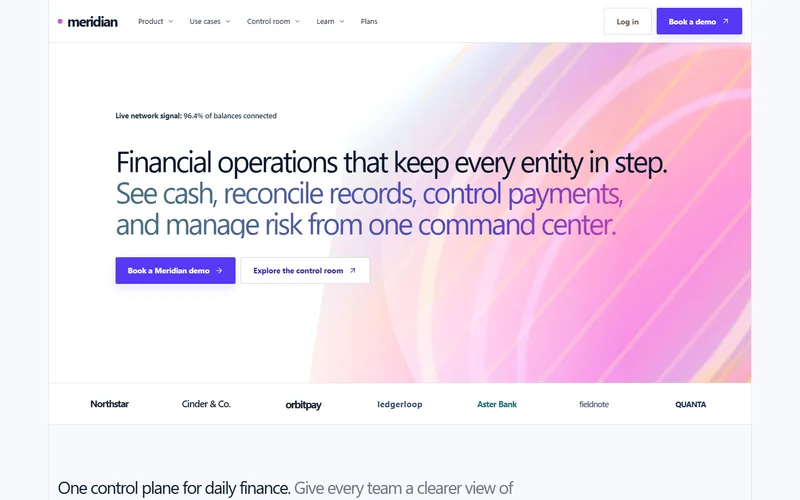
Built in iter0 for a finance product that has to earn trust fast.
Open examplePrices
What each plan costs.
Checked on each pricing page on 22 October 2026. Prices are in US dollars.
Webflow AI Site Builder and iter0: common questions
Is iter0 a Webflow alternative?
Webflow's AI site builder creates a multi-page site and a foundational design system that you keep extending in Webflow, with CMS, hosting, and SEO tools around it. iter0 builds one focused page per build from a brief or a current site, can add pages to a saved site, and can publish each site at its own <name>.iter0.app address (your plan sets how many can be live at once). So iter0 can replace Webflow for a small launch site. Once you need a CMS, a growing set of pages, or a custom domain on the same platform, use Webflow.
How many pages can Webflow's AI site builder create?
Webflow's help centre says a site without a paid Workspace or Site plan is limited to two pages in total. With either type of paid plan, the AI site builder generates up to five pages at first, and you can add more afterwards. iter0 produces one complete page per build and can add pages to a saved site, but it has no CMS, so it suits a small launch site better than a large one.
Can I export code from Webflow or iter0?
Webflow's help centre says code export is available on paid Workspace plans, not Site plans, and that CMS content is not included in the exported code. iter0 lets you view and edit a page's HTML in the builder, copy it, or download it as a standalone HTML file. In both cases, test forms and any connected features after moving the code to a new host.
Should a startup use Webflow or iter0 for its first website?
If you already know the site will need several pages, a blog or CMS, and a team editing content, starting in Webflow saves a later rebuild. If you need one page soon and the harder question is what it should say to a specific buyer, the iter0 Launch CEO conversation and single-page build fit better. You can move to Webflow once the message is settled.
Keep comparing
More comparisons and reading.
- AI website builders comparedDo you need business tools in one place, or help working out what your site should say?
- iter0 vs v0Are you building the app, or the website that sells it?
- iter0 vs FramerDo you need a design canvas, or help with what to say?
- iter0 vs LovableAre you building the app, the website, or both?
- iter0 vs DurableDo you need bookings and a customer list, or a launch page you own as files?
Try your own brief.
Tell the Launch CEO what you sell. It checks your competitors, asks what it needs, and builds your site. Free to start.