
iter0 and Lovable
iter0 vs Lovable: the app or the page that sells it
Pick Lovable if you are building a working app with sign-in, a database and code you will keep. Pick iter0 for the launch site of what you built in Lovable, Bolt or v0, made from a brief: it checks your competitors, sharpens the pitch and can show you three designs before it builds. We gave both the same two briefs; you can compare the results below.
Are you building the app, the website, or both?
Updated
Our test, 5 October 2026
Same brief, side by side.
We typed the same two briefs into iter0 and Lovable and kept what each one built. Free plans for the others; the screenshots are as captured, from each tool's own preview or canvas.
Tablemate
“I have an idea for an app called Tablemate that helps groups of friends plan dinners out: everyone adds the nights they're free and what food they like, and it suggests a time and a restaurant that works for everyone. Build a landing page for it.”

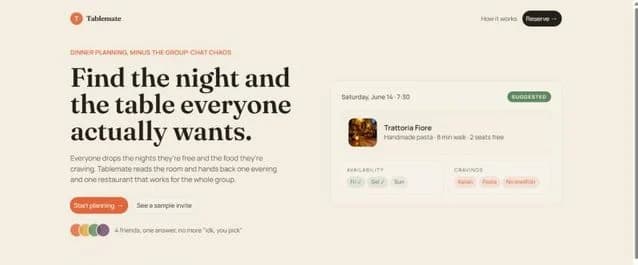
Shiplog
“Build a website for Shiplog, a B2B SaaS tool that turns merged GitHub pull requests into customer-facing release notes and a changelog page automatically. It's for engineering teams at startups with 10 to 200 people. I want visitors to start a 14-day free trial.”


Decision table
Compare the work you need to keep doing.
Which to choose
When each tool is the better choice.
Choose Lovable when
You are building a working web application with a frontend, backend, database, authentication, and integrations.
You want to describe the product in chat, refine it with visual and inline edits, and publish it to a live URL from the same project.
You want the application code synced to GitHub, GitLab, or Bitbucket so developers can work on it outside the platform.
Choose iter0 when
You need the public page that explains the product to buyers, kept apart from the application they will sign in to.
The app works but you cannot yet say in one sentence who it is for, and you want Launch CEO to work through the buyer, offer, and proof before the page is built.
The marketing page should follow your current site or a site whose design you like, and you want it as one editable HTML file instead of another part of the app project.
How to decide
Keep application proof attached to the real product
If Lovable builds the application and iter0 builds the website, use actual product screens and verified capabilities on the marketing page. Do not let draft application ideas become published claims.
Mark built features separately from proposed features.
Use current product screens.
Test authentication and data flows in the application.
Test the website's message, responsive layout, and primary action.
Using both
Build the app in Lovable and the launch page in iter0
Build the application in Lovable, where the backend, authentication, and publishing live, and where the code can sync to GitHub, GitLab, or Bitbucket. Build the marketing page in iter0, and before it goes live, check every product claim against a feature that already works in the published Lovable app. Take the page's product images from that app too, as screenshots, so buyers see the screens they will sign in to. Download the page as HTML and host it where you choose. Keep a short list of which features are built and which are planned. When a planned feature ships in Lovable, add it to the page; when one is dropped, remove the promise.
iter0 design example
Example: turn application detail into a public product story
Agent Operations uses product-like panels as evidence, then places them inside a website hierarchy. That keeps application depth visible without turning the whole launch page into an unlabeled dashboard.
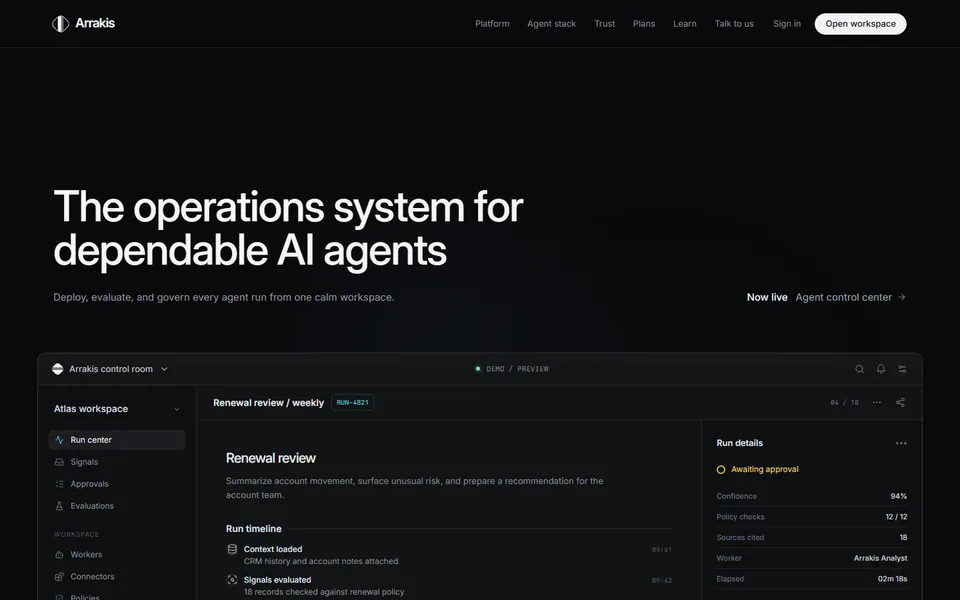
Built in iter0 for an AI product, using product-like panels as proof.
Open examplePrices
What each plan costs.
Checked on each pricing page on 22 October 2026. Prices are in US dollars.
Lovable and iter0: common questions
Can I use Lovable and iter0 together?
Yes. Lovable builds and publishes the web application, including the backend, database, and authentication. iter0 builds the launch page that explains the application to buyers. The two connect through a link: point the page's sign-up button at the application's live URL, so a buyer who clicks it goes straight into the product.
Can iter0 build a working app like Lovable does?
No. Lovable describes itself as a full-stack AI development platform for building and deploying web applications, and it can also build websites. iter0 builds one editable HTML page per build, with no application logic, database, or sign-in behind it. If your product needs those, build it in Lovable or a similar tool, and use iter0 for the page that sells it.
Can Lovable build a landing page instead of an app?
Yes. Lovable's documentation lists websites among the things it builds, and its quick start example is a website for a neighbourhood cafe, published to a lovable.app address. If the landing page is simple and you already work in Lovable, keeping it there is reasonable. iter0 is more useful when the page's message and proof are unresolved, or when you want to build from an existing site or site whose design you like.
Where does each tool publish my site?
Lovable publishes projects to a lovable.app subdomain with HTTPS by default, and its documentation says paid plans can add a custom domain. iter0 can publish each site at its own <name>.iter0.app address (your plan sets how many can be live at once). You can also save the page, copy the HTML, or download it as a file, then deploy it with the hosting provider you choose. If you want your own domain on the published site, Lovable is the simpler option.
Keep comparing
More comparisons and reading.
- AI website builders comparedDo you need business tools in one place, or help working out what your site should say?
- iter0 vs v0Are you building the app, or the website that sells it?
- iter0 vs FramerDo you need a design canvas, or help with what to say?
- iter0 vs WebflowDo you need a content platform now, or a clear launch site first?
- iter0 vs DurableDo you need bookings and a customer list, or a launch page you own as files?
Try your own brief.
Tell the Launch CEO what you sell. It checks your competitors, asks what it needs, and builds your site. Free to start.