iter0
Back to templates

AI Agents

AI Agent Platform Website

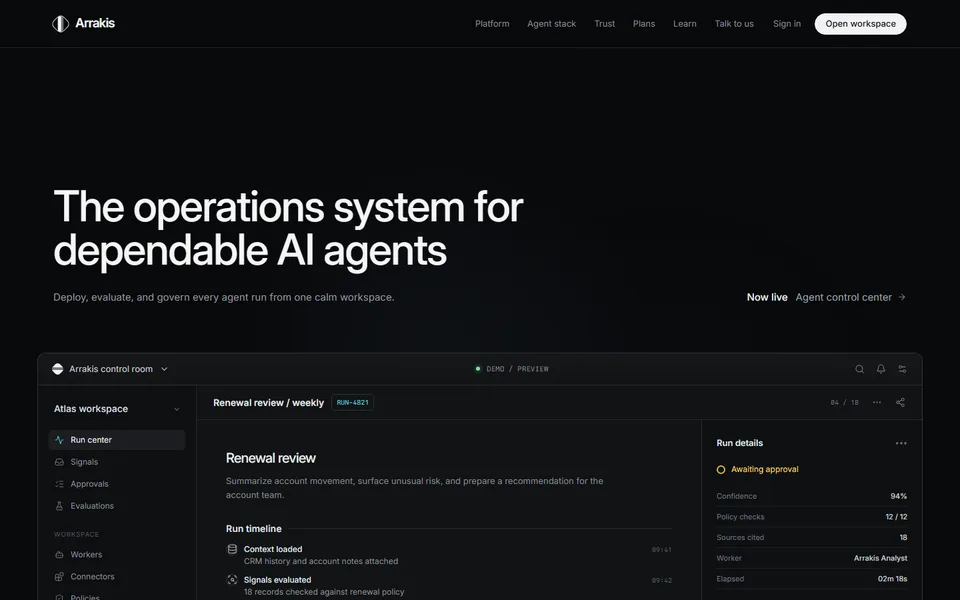
A dark, product-led system for showing agent runs, evaluations, approvals, integrations, and operational trust.

Best for

AI agents, developer tools, workflow platforms, technical B2B SaaS

Start with this visual direction, then adapt the content to your business in the builder.

Use this template

Page flow

A clear path through the product story

The page opens on the operating problem, then moves into a working agent console. Workflow stages, approvals, traces, evaluations and integrations follow in the order a technical buyer would assess them before a final workspace call to action.

What it communicates

Why this structure works

This structure makes an abstract AI platform feel inspectable. It communicates that agents can move work forward without hiding the controls, evidence and human decisions that make the system trustworthy.

How to adapt it

Make it about your business

  1. Replace the agent workspace demo with a screenshot or recording of your own run history, using the run statuses your product shows.
  2. Rewrite the workflow steps and approval gates to match where a person reviews or overrides an agent in your product today.
  3. Swap the evaluation features for the checks you run, such as test suites, scoring rubrics or trace review.
  4. Point the resource cards and final call to action at your documentation, pricing page or demo booking page.

What to bring

Prepare these before you build

  • Screenshots of your agent console, run logs or trace views, with customer data removed
  • A plain description of one complete agent task, from trigger to result
  • The integrations you support today, kept separate from those still on the roadmap
  • A description of how approvals, permissions and audit records work in your product
  • Any published evaluation results or customer quotes you have permission to use

The template sets the visual direction. Your own business details, brand, images and proof supply the content.

AI Agent Platform Website template questions

What should an AI agent platform website include?

Start with one task the agent completes, such as triaging a support ticket, before explaining the architecture. A technical buyer will then look for the step where a person approves or stops the agent, how each run is logged and scored, and which tools the agent can call. This template has a section for each, so your screenshots can answer those questions instead of general claims about autonomy.

Can I use this template for an AI startup that is still in beta?

Yes. Describe what works today and label anything that is not yet available. A beta page can show fewer integrations in the workspace demo, mark planned evaluation checks as coming soon and use a waitlist call to action instead of a sign-up. Keep planned features out of the live sections, because technical buyers often sign up to try a feature they have just read about.

How do I show agent safety and human approval on a landing page?

Use the approval gates section to show the point where a person reviews, edits or rejects an action the agent has proposed, with a screenshot of that screen. Underneath, say what your product records afterwards, for example who approved the action and when. If the page names a security standard or certification, ask the person responsible for it to check the wording, because the builder uses the claims you supply without checking them.