AIDesigner vs iter0: which website cloner should you use?
See one page cloned by AIDesigner and by iter0, then compare the two products: their features, cost, outcomes and the problems each one solves.

8 min read
In this note
Which website cloner should you use?
It depends on what you plan to do with the page afterwards. AIDesigner's Website Cloner turns a public URL into Tailwind HTML that you can edit, publish from AIDesigner or hand to a coding agent. iter0's Clone rebuilds a page you own or are authorised to reproduce as editable HTML and CSS in the iter0 builder, where you keep editing and can export the HTML or open a GitHub pull request. Each tool clones one URL at a time, and each site states that a clone costs one credit, although one of AIDesigner's guides says two.
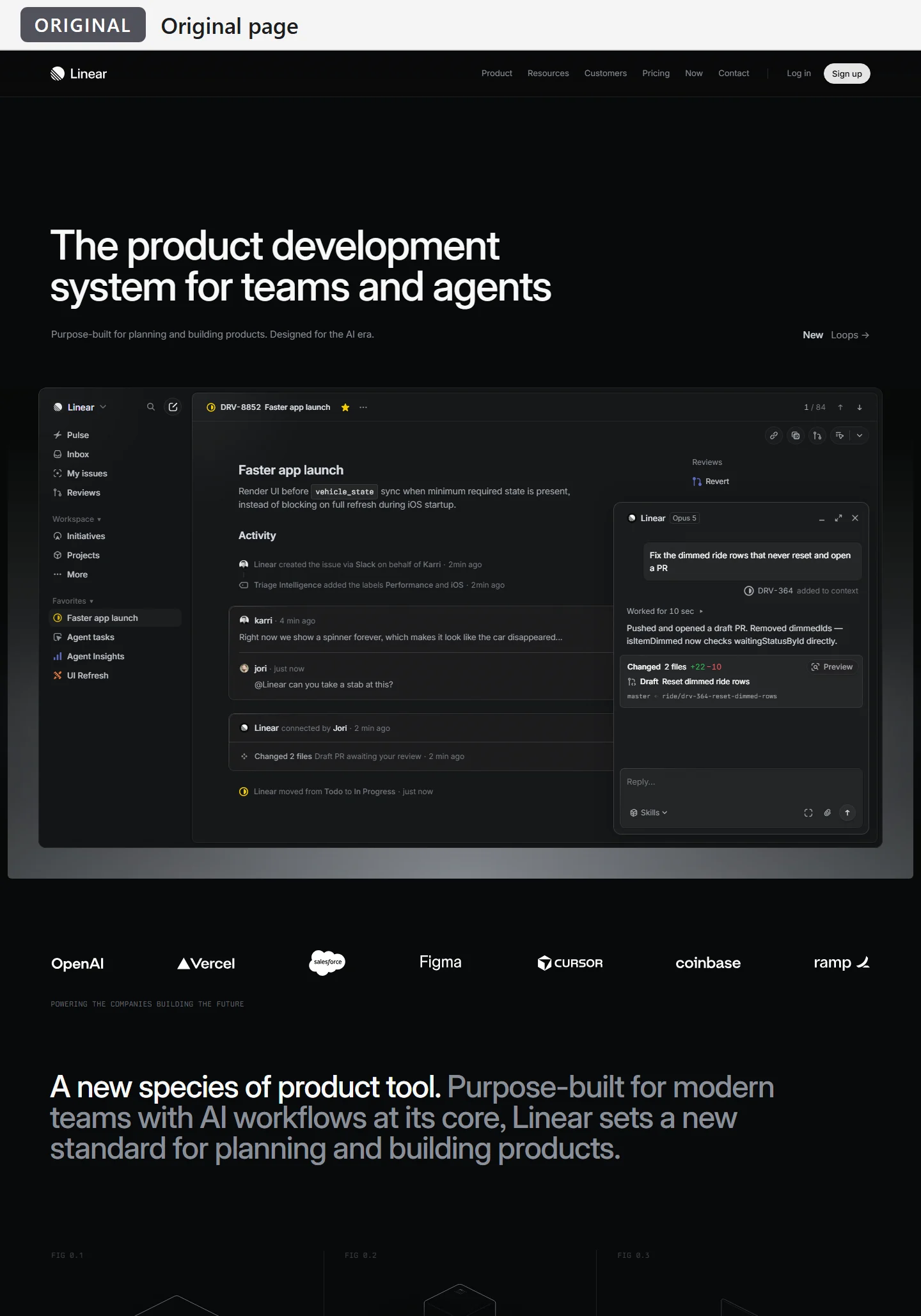
The original page: Linear's home page
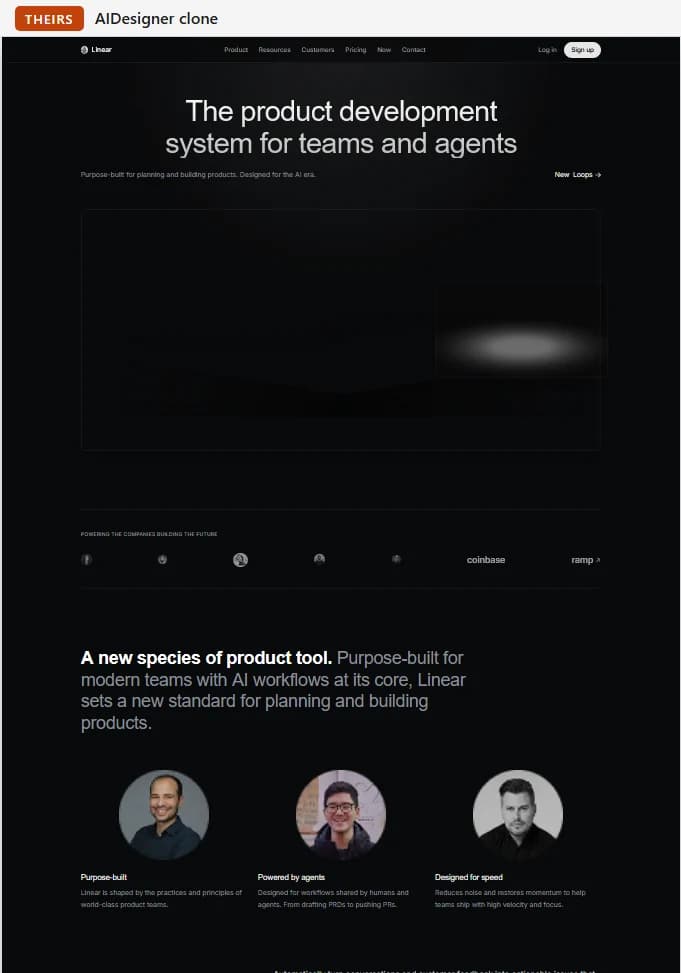
AIDesigner's clone (theirs)
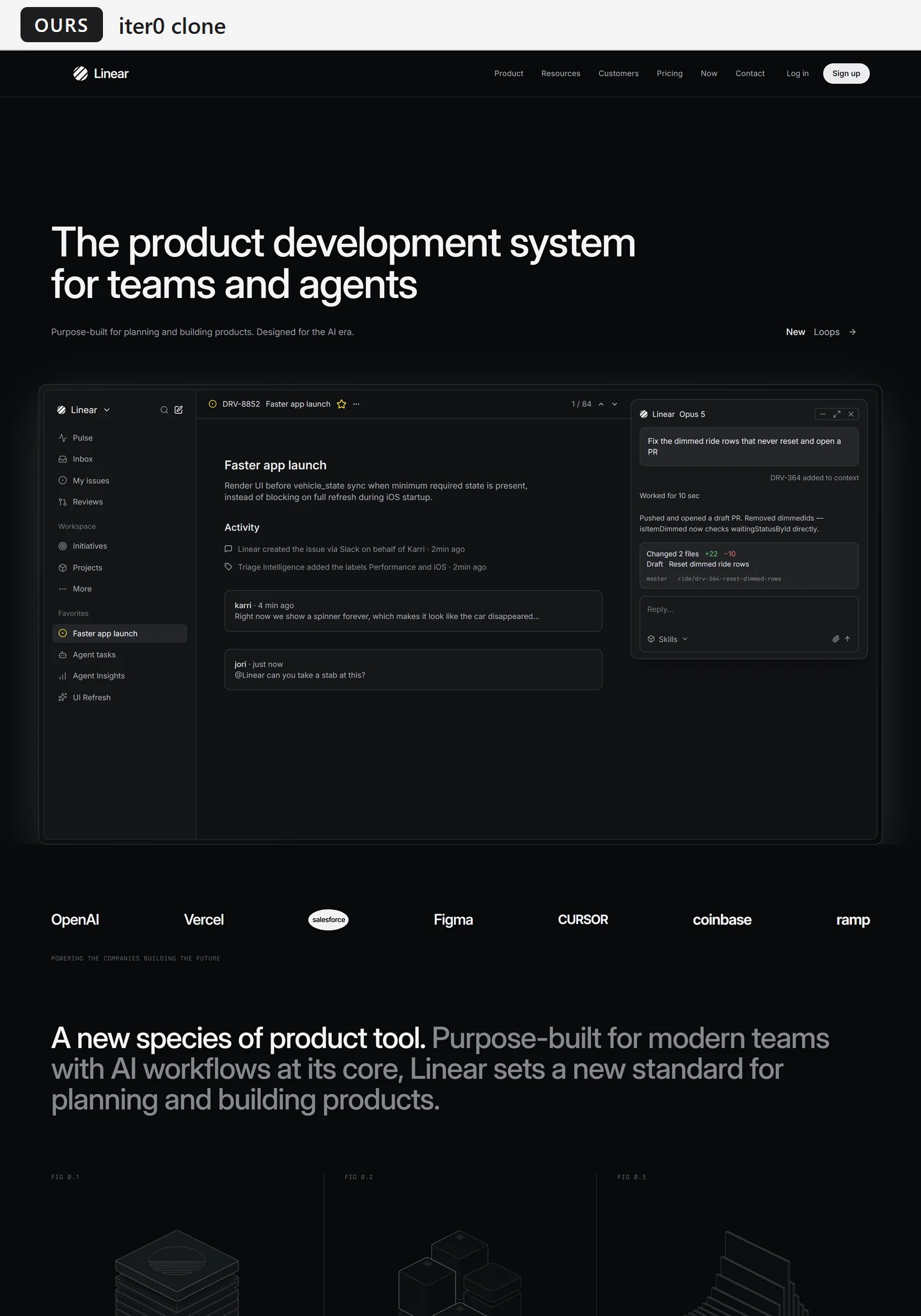
iter0's clone (ours)
What is each product, and who is it for?
AIDesigner is an AI design platform. Its home page says it turns prompts into website UI, mobile app screens, images, brand kits, logos and ads for founders, product teams and creators. The Website Cloner is one of its tools, listed beside AI Website Redesign, Image to HTML, a Brand Kit Generator and an MCP server for coding assistants.
iter0 is an AI website builder for tech-startup founders who have a product to sell and no marketer, according to its home page. A chat agent called the Launch CEO asks about the product, three researchers read the founder's site and rivals, and iter0 builds three designs from the resulting brief. Clone is one of several ways to start, next to describing a product, adding a reference site and Extract + Design.
Which features does each tool offer?
Both take a public URL and return a page you can edit, and both offer starter templates. Beyond that, the feature lists differ.
- Inputs: AIDesigner takes a prompt, a URL, a screenshot or reference images, and it can apply a saved brand kit. iter0 takes a description of your product, a site address, an uploaded image or a reference site, and both Clone and Extract + Design start from a URL.
- What it makes: AIDesigner makes website UI, mobile app screens, images, logos, brand kits and ads. iter0 makes websites, either one page or several pages that share one header, footer and set of styles.
- Research and messaging: iter0's Launch CEO asks questions, its researchers read your site and your rivals, and the brief names its sources. On the pages we read, AIDesigner describes design quality and brand consistency but no research step.
- Editing: AIDesigner has a visual editor and an AI chat. iter0 lets you click a part of the page and say what to change, and only that part changes.
- Publishing and handoff: AIDesigner publishes to a free subdomain or your own domain with SSL and a CDN, exports the HTML, and connects to coding agents through its MCP server. iter0 downloads or copies the HTML, opens a GitHub pull request with a checked Vercel preview, and lets you connect your own agent.
What outcome does each tool aim for?
AIDesigner aims at a polished design that you can publish or give to a developer. Its home page says the designs do not look AI-generated, and its MCP server lets coding agents read and create designs and turn them into production work.
iter0 aims at a site whose message has been tested. Its brief says who the site is for, what to lead with, what proves it and what to cut, and three designs are built from that brief. iter0's pages add that it cannot promise sales. On the pages we read, neither company publishes a measured result for conversions.
Which problem does each tool solve?
The two companies name different problems, including for cloning.
- AIDesigner, in general: you need polished design and have no design experience. Its FAQ says it is for founders, developers, marketers and product teams who want a polished result without starting from a blank canvas or learning a design tool.
- AIDesigner, for cloning: you have a page whose structure you want to study or borrow, or a redesign you want to start faster. Its cloner page lists landing pages, portfolios, ecommerce pages and competitor layouts as uses.
- iter0, in general: you know what you sell but not what to say to a stranger, and your rivals use the same line you do. The Launch CEO asks questions, checks competitors and drops claims you cannot prove.
- iter0, for cloning: you own a page but the source files are gone, or you want to move off a closed builder. Clone rebuilds what a visitor sees as an editable draft. It does not reconnect your form or recover your analytics.
How much does a clone cost?
iter0's start menu shows Clone at 1 credit, and the send button repeats the price before you confirm. A signed-out visitor who enters a URL is asked to create a free account first, and the message says the clone uses one of the free credits. The Free plan has 3 credits a month, Hobby ($5 a month) has 15 and Pro ($25 a month) has 100. An AI edit costs half a credit. Manual edits, saves and undo cost nothing.
AIDesigner's Website Cloner page says each clone uses 1 credit. Its July 2026 guide to cloning says a clone costs 2 credits, one to analyse the site and one to generate the design, and lists 5 free lifetime credits and 100 credits a month on a $25 Pro plan. Its pricing page shows the same Pro price and credit count, and lists unlimited publishing and custom domains under Pro, so check what a free account allows before you rely on it. At that price you get either 100 clones or 50, depending on which of AIDesigner's pages is current.
How accurate does each tool say a clone is?
AIDesigner's cloner page promises an editable 1:1 copy and calls its clones highly accurate. Its FAQ adds that some dynamic elements and complex interactions may need manual refinement, and that pages behind a login or heavy with JavaScript may be only partly supported. Its July 2026 guide advises treating a clone as a strong starting point rather than an identical copy.
iter0's page makes a narrower promise: an editable draft of what a visitor can see. It says a public URL does not expose the original source files, database, form delivery, payments or analytics, and it tells you to compare the draft with the original at desktop and phone widths and to flag what the capture missed. On the pages we read, neither site gives a measured accuracy figure, so the only evidence is a result you inspect yourself.
How do you check a clone before you rely on it?
Open the original and the clone at the same width, first on a desktop and then on a phone. Start with the parts a page draws with scripts or media, such as hero panels, logo rows, videos and illustrations, because the text can look right while those parts are missing. Then read each heading against the original and click every link, since a clone can look finished while its buttons still lead to the reference site. Both sites tell you to replace the reference page's branding, copy and images before you publish, so swap its name, logos, quotes and numbers for your own before anything goes live.
Can you clone another company's page?
Both sites address this, in different ways. AIDesigner's cloner FAQ says copying a design for personal use, learning or inspiration is generally acceptable, that copying copyrighted content or trademarks, or impersonating someone, may break the law, and that you should write original content. iter0's Clone page limits the tool to a public page you own or are authorised to reproduce.
If you want another site's look with your own content, iter0 offers Extract + Design, also at 1 credit in the start menu. It takes the design from one URL and the content from another. We used the reference page only to compare the two tools. A clone of it is not a page to publish.
When is each tool the better choice?
AIDesigner fits when you want the finished page published from the same tool, when you want Tailwind HTML as the output, or when a coding agent will take the design over through its MCP server. iter0 fits when you own the page or have permission to reproduce it, when you want the page's message tested before you build, or when you want the result in your own GitHub repository as a pull request that you merge yourself. Each company also has a separate redesign tool: AIDesigner's AI Website Redesign and iter0's AI website redesign.
To compare them on a page of your own, run the same URL through both tools and apply the checks above.
What could we not check?
We did not create an AIDesigner account, so everything here about it comes from its public pages and from one screenshot of its output. We do not know which plan or settings produced that screenshot. The screenshot has fewer pixels than the 1440 px iter0 capture, so it looks softer, which comes from how the two were captured and not from either tool. We did not test AIDesigner's export, MCP server or publishing, and we did not compare them with iter0's Export and GitHub buttons. We cannot say how a clone made today differs from the ones shown. For iter0 we read its public pages and pricing page and ran the clone of Linear's home page ourselves, in a test account, so the credits, plan and settings a customer has may give a different result. Each tool gets one page and one run here, which is not a benchmark, and this comparison is published on iter0's own site. Compare each clone with the original, then run a URL of your own through both tools.
Website cloner
A launch page should make the buyer, promise, proof, and next action obvious. iter0 uses this same standard when it turns a brief or reference site into a builder-ready page.
Start your launch build