
iter0
Back to templates

SaaS

Product Analytics Website

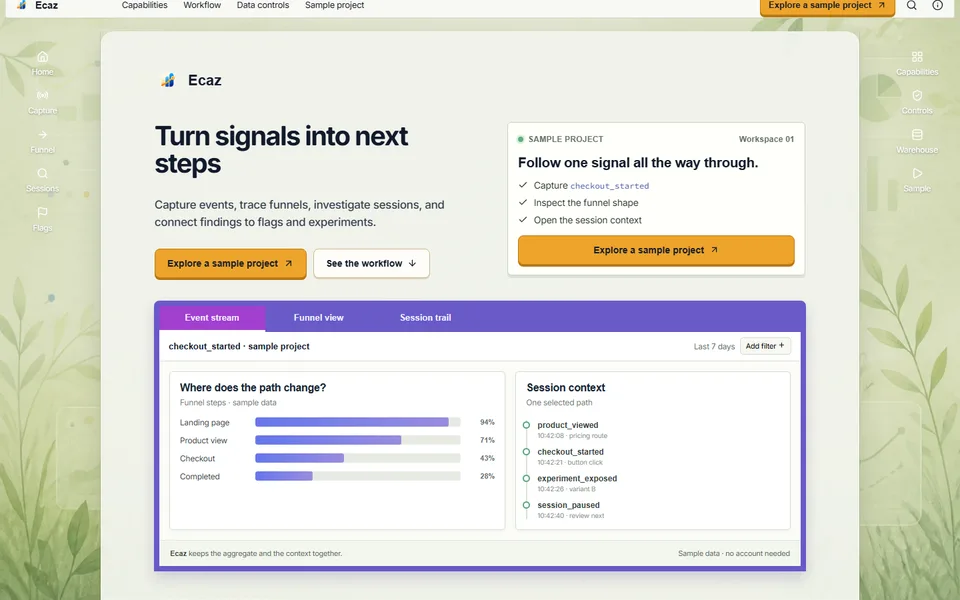
A playful application-style template connecting event capture, funnels, session context, feature flags, experiments and data controls inside one clear product story.

Best for

product analytics, event platforms, feature management, product operations software

Start with this visual direction, then adapt the content to your business in the builder.

Use this template

Page flow

A clear path through the product story

A playful application window introduces one product signal, then follows it through events, funnels and session context. Feature flags, experiments, data controls and warehouse export show how insight connects to the next release decision.

What it communicates

Why this structure works

The structure keeps analytics tied to product work rather than abstract dashboards. It communicates how teams move from an observed behaviour to investigation, action and controlled release.

How to adapt it

Make it about your business

  1. Replace the sample signal in the application-style hero with one insight your product surfaces, shown on demo data.
  2. Rewrite the event stream, funnel analysis and session context sections with screens from your product, in the order a user investigates.
  3. Keep feature flags and the experiment workflow only if you offer them, and describe how they connect to your analytics.
  4. Point the sample project call to action at your demo project, sandbox or sign-up page.

What to bring

Prepare these before you build

  • Screenshots or recordings built on demo data, never real user sessions
  • The event sources, SDKs and warehouse connections you support
  • How session data is masked, stored and deleted
  • Pricing, including how events or seats are counted
  • A short worked example of a team finding and fixing a product problem

The template sets the visual direction. Your own business details, brand, images and proof supply the content.

Product Analytics Website template questions

What should a product analytics website include?

Show how a team moves from a signal to a decision: capturing events, finding a drop-off in a funnel, understanding sessions and then acting through a release or experiment. Buyers also check data controls and pricing early. This template follows one signal through that sequence. Use demo data in every screenshot, and state data retention and masking exactly as they work.

Can I use this template for a feature flag or experimentation tool?

Yes. Move the feature flags and experiment workflow sections higher, and reduce the funnel and session material to the parts that support rollout decisions. The application-style hero works well for showing a flag being switched or an experiment result. Replace the sample project call to action with your sandbox or trial, and describe only the targeting options you support.

How do I show analytics screenshots without exposing customer data?

Build screenshots from a demo project with invented users and events, and never capture real session recordings for marketing. Check that names, email addresses and IP addresses are absent from every image, including small interface details such as account menus. Crop or blur anything personal before you upload an image. The template's application window also works with simplified or illustrated screens, which contain no personal data.