iter0
Back to templates

Devtools

AI Coding Tool Website

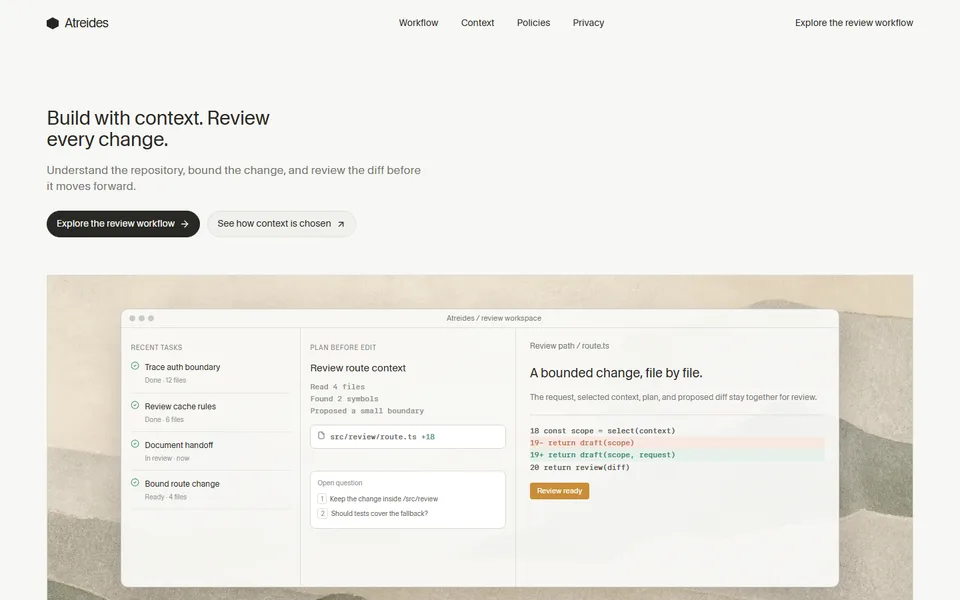
A restrained coding-tool template with visible repository context, bounded plans, editable review examples, team controls and a clear route from request to decision.

Best for

AI coding tools, developer environments, code review products, engineering workflow software

Start with this visual direction, then adapt the content to your business in the builder.

Use this template

Page flow

A clear path through the product story

The hero introduces coding with visible context, followed by a concrete sequence for selecting files, planning edits and reviewing a diff. Team boundaries, privacy choices and review records then answer the questions that matter before adoption.

What it communicates

Why this structure works

This structure demonstrates agentic coding without pretending every change should be automatic. It communicates how developers stay involved, where decisions are recorded and how teams can set practical limits.

How to adapt it

Make it about your business

  1. Replace the repository context demo with a capture of your tool reading a sample codebase, never a client's private code.
  2. Rewrite the plan-before-edit steps and diff review to match exactly how your product proposes and applies changes.
  3. Update team controls and privacy choices with your settings for data retention, model providers and access.
  4. Change the review call to action to your install, trial or waitlist link.

What to bring

Prepare these before you build

  • Screen recordings of your tool working on an open-source or sample repository
  • Supported editors, languages and version control systems
  • Your data handling policy: what code is sent, stored or used for training
  • Team and admin features available on each plan
  • Any benchmark results you can reproduce, with the method described

The template sets the visual direction. Your own business details, brand, images and proof supply the content.

AI Coding Tool Website template questions

What should an AI coding assistant website include?

Developers want to see how the tool behaves on real code: how it gathers context, whether it plans before editing, how changes are reviewed and what happens to their code. This template shows a repository context demo, plan-before-edit steps and diff review, then team and privacy controls. Use recordings on sample repositories, and describe data handling exactly as your policy states.

How do I market an AI developer tool without overpromising?

Show a complete task, including the moments where the developer reviews or rejects a suggestion, rather than claiming the tool replaces engineering work. The diff review section keeps the developer's approval step on screen. If you quote a figure such as time saved per pull request, put the sample size, the task and the measurement method beside the number.

Can I use this template for a code review or testing product?

Yes. The diff review and plan-before-edit sections suit code review assistants, test generation tools and static analysis products. Replace the sample diff with a real example from your tool, rename the workflow steps to match your process and keep the team controls section if organisations configure rules or permissions. Change the review call to action to a trial or install link.